
Manu Thiyyas
CEO & Co-founder, hiRobin
In this article
The overcorrection problem nobody talks about
What actually works in 2026 (and what doesn't)
The real question: what if you didn't have to choose?
Quick spam call setup checklist (do these today)
How Call Screening Works (And Why India Still Doesn't Have It)
There's a feature on Google Pixel phones in the US that solves one of the most annoying problems with phone calls. When an unknown number rings, instead of you picking up, Google Assistant answers. It asks the caller who they are and why they're calling. You see a live transcript on your screen, and you decide whether to take the call, send a quick reply, or hang up.
It's called Call Screening. It launched in 2018. And eight years later, it's still not available in India.
That's worth thinking about because India, by almost every measure, needs call screening more than any other country in the world.
What call screening actually is
Call screening is simple in concept. Instead of a call going straight to your phone and ringing, something sits in between. That something answers the call, asks the caller to identify themselves and state their reason for calling, and shows you the information so you can decide what to do.
Google's version works like this: an unknown number calls, Google Assistant picks up and says something like "Hi, the person you're calling is using a screening service. Please state your name and the reason for your call." The caller speaks, and you see a real-time transcript on your screen. You can tap "Pick up" to join the call, tap a quick reply like "Is it urgent?", or tap "Mark as spam" to end it.
The key difference between call screening and call blocking is that screening doesn't make a binary decision for you. It doesn't block the call or let it through. It gathers information first, then lets you decide. That's a fundamentally better approach than what caller ID apps do, because it works even when the number isn't in any database.
A delivery driver calling from a new number? Call screening asks them who they are. A scammer? They usually hang up the moment they hear an automated greeting. A clinic calling back? The transcript shows you exactly why they're calling, and you can pick up mid-conversation.
Why India doesn't have it yet
Google's Call Screening has been available in the US, Canada, Australia, and Japan for years. India, despite being one of Google's largest markets and one of the most spam-call-affected countries on the planet, still doesn't have it.
An APK teardown of the Google Phone app in mid-2025 found Hindi language files and a string called "enableIndiaManualScreeningOnlyMode," which suggests Google is working on an India version. But it's been radio silence since then. Google's own VP of product acknowledged in 2024 that the delay wasn't technical but related to policy and regulatory hurdles.
The regulatory concern is understandable. Call screening involves an automated system answering calls and recording caller audio, which intersects with India's telecom regulations and data privacy laws. But the result is that the country with the worst spam call problem in the world is stuck waiting for a solution that's been working perfectly fine elsewhere for eight years.
What about Truecaller's call screening?
Truecaller launched its own version of call screening in India called Truecaller Assistant. It works similarly: when an unknown number calls, the assistant answers, asks the caller to state their purpose, and gives you a transcript.
It's a step in the right direction, but there are catches. The feature costs Rs 149/month after a 14-day free trial. It's part of the Truecaller Premium plan, which means you're still inside the Truecaller ecosystem with all the privacy tradeoffs that come with it, including contact upload and data sharing. And the assistant's capabilities are limited. It can transcribe what the caller says, but it can't actually do anything with that information. If a delivery driver says "I'm at the gate," you still need to pick up the phone and tell them where to go.
In other words, Truecaller's version screens calls but doesn't handle them. Truecaller isn't the only one experimenting with this. Equal AI takes a similar screening-first approach for Android users in India and here's how it compares to Robin's handle-it-fully model.
The gap between screening and handling
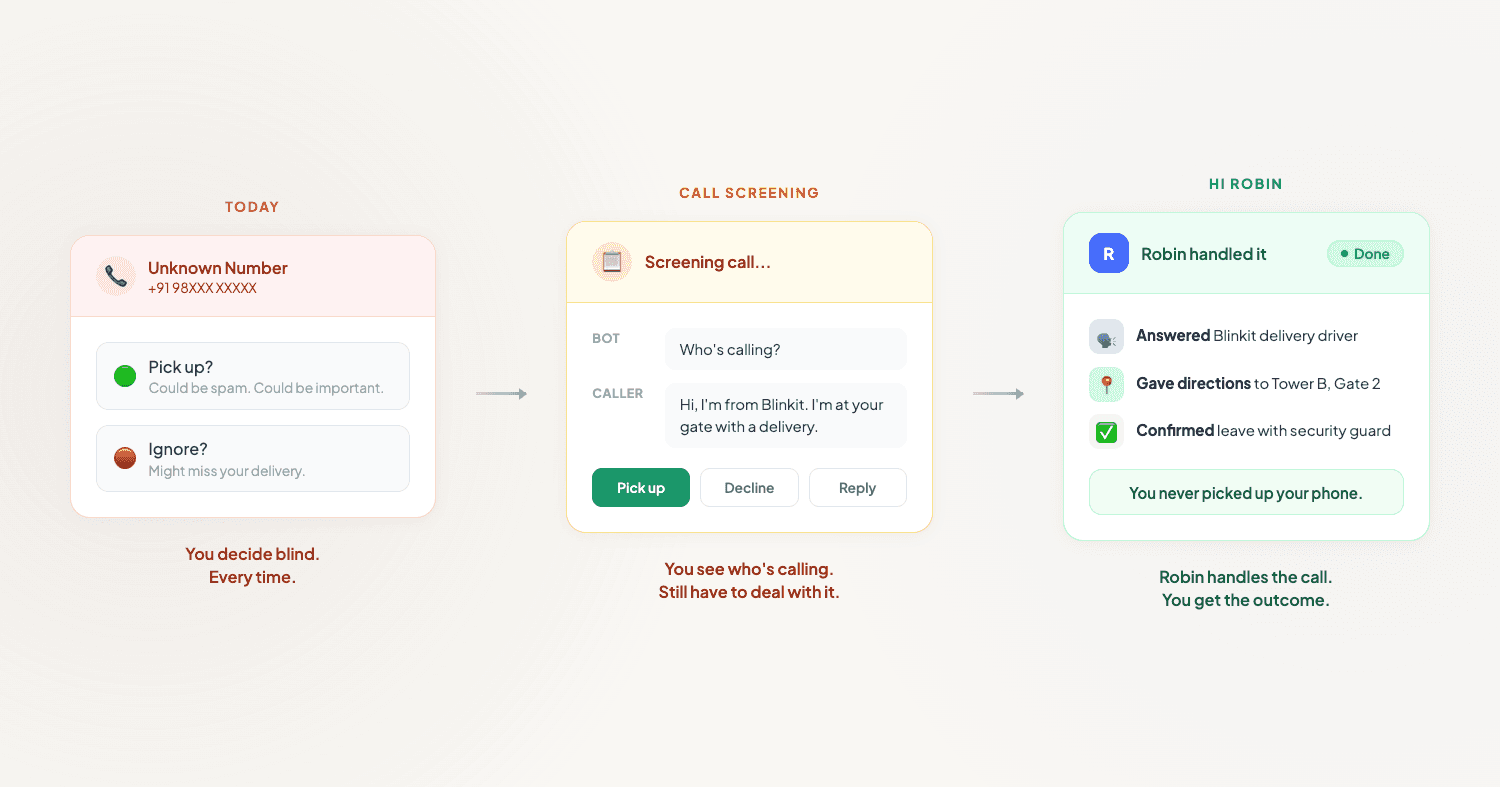
This is the distinction that matters. Call screening tells you who's calling and why. That's useful. But it still leaves you with a decision to make and a call to take.
Think about the calls that actually eat up your time. It's not just knowing that Blinkit is calling. It's the 90-second conversation where you tell the driver which building, which floor, and to leave it with the guard. It's not just knowing that the clinic is calling back. It's the back-and-forth about available slots, rescheduling, and confirming the new time.
Screening gives you information. Handling gives you outcomes.
The delivery driver calls. A phone assistant picks up, checks the context, tells the driver the building and gate code, confirms the delivery, and sends you a notification. You never had to look at your phone.
The clinic calls to reschedule. A phone assistant checks your preferences, negotiates a new slot, confirms the appointment, and adds it to your calendar. You find out about it after the fact, when it's already taken care of.
The spam call comes in. A phone assistant answers, the scammer hears an automated voice, and hangs up. You don't even see a notification because nothing happened worth notifying you about.
That's what handling looks like. And it's what we're building with hi Robin.
How hi Robin goes beyond call screening
Robin is an AI phone assistant that doesn't just screen your calls. It answers them, understands the context, and takes action.
When an unknown number calls, Robin picks up. It talks to the caller in natural language. It figures out what the call is about. And then it does one of three things: handles it completely (delivery instructions, appointment rescheduling, information requests), sends you a summary with the key details so you can follow up if needed, or dismisses it if it's spam or irrelevant.
The difference from call screening:
Call screening shows you a transcript and asks you to decide. Robin decides and acts, and only involves you when your input is genuinely needed.
Call screening works on the calls you receive while looking at your phone. Robin works whether your phone is in your pocket, you're in a meeting, you're driving, or you're asleep.
Call screening tells you the delivery driver is at the gate. Robin tells the delivery driver where to go.
No contact upload. No premium subscription to an app that already has your data. No watching a transcript scroll by while you're trying to focus on something else.
If call screening is the feature India has been waiting for, Robin is what comes after it.

Your phone should work
for you.
Just say hi robin and never worry about incoming calls again. Robin picks up, handles it, and lets you know what happened.
Download hiRobin
