
Manu Thiyyas
CEO & Co-founder, hiRobin
In this article
Step 1: Request a refund through the app
Step 2: When the automated system says no
Step 3: Email escalation
Step 4: Social media escalation
Step 5: The nuclear option (Consumer Forum)
Refund timelines you should know
Swiggy's cancellation policy
We've all been there. The order shows "Delivered" but nobody knocked on your door. Or the food arrived cold, half the items missing, and the packaging looked like it survived a monsoon. Or you cancelled within a minute but got charged the full amount anyway.
Getting a refund from Swiggy shouldn't be hard. And in many cases, it isn't. But when the automated system says no, things get frustrating fast. Here's a complete walkthrough of how Swiggy's refund process actually works, what to do when the app denies your request, and how to escalate when nothing else works.
Step 1: Request a refund through the app
This is the starting point for every refund request. Open Swiggy, tap your profile picture in the top right, go to Orders, and find the order in question.
Tap the order, then look for "Help" or "Support." You'll see a list of issue categories: wrong item delivered, missing items, quality issues, order not delivered, and so on. Pick the one that matches your problem.
For missing items or wrong orders, Swiggy's automated system usually processes refunds instantly. You'll see a "Compensation" option, and the refund hits your Swiggy wallet or original payment method within a few hours to a few days depending on your bank.
The key here: do this within 24 hours of delivery. Swiggy's policy allows refund requests up to 7 days after delivery, but requests made within a few hours of receiving the order have a much higher success rate because the system can still verify the issue with the restaurant.
Step 2: When the automated system says no
This is where most people get stuck. You file a refund request, and the app responds with something like "We're unable to process a refund for this order" or gives you a partial refund that doesn't match what you lost.
The reasons vary. Swiggy's algorithm flags accounts that request refunds frequently. If you've had multiple refund requests in a short period (even if they were all legitimate), the system may start auto-rejecting. Sometimes the restaurant disputes the claim, and Swiggy sides with them.
When this happens, don't give up. Move to live chat.
In the app, go to Help, then look for the option to chat with an agent. Explain the situation clearly: your order ID, what went wrong, and what resolution you want. Be specific. "I ordered 3 items and only received 2. The missing item was [name]. I'd like a refund of Rs [amount] for the missing item." Screenshots of the delivered order help.
The live chat agents have more authority than the automated system. They can override auto-rejections and process refunds that the algorithm blocked.
Step 3: Email escalation
If live chat doesn't resolve it, email support@swiggy.in with your order ID, a description of the issue, and any screenshots or evidence. Keep it factual and concise.
If the first email doesn't work, escalate to grievances@swiggy.in. This goes to a different team that handles unresolved complaints. Mention that you've already tried the app and live chat without resolution.
Include the exact amount you're owed and state clearly what outcome you want. "I am requesting a full refund of Rs [amount] to my original payment method."
Step 4: Social media escalation
Swiggy's customer care team on X (formerly Twitter) at @SwiggyCares is surprisingly responsive. A public tweet with your order ID and a brief description of the issue often gets faster attention than private channels because nobody wants complaints sitting in public view.
Keep it professional. Something like: "@SwiggyCares Order #[ID] was never delivered but I was charged Rs [amount]. App denied my refund request. Live chat couldn't resolve. Can someone look into this?"
This usually triggers a DM from their social team within a few hours.
Step 5: The nuclear option (Consumer Forum)
If the amount is significant and none of the above worked, you can file a complaint with the Consumer Dispute Redressal Commission. In fact, a consumer court in Ahmedabad ordered Swiggy to pay Rs 1,000 in compensation to a customer over an unrefunded amount of just Rs 104, ruling that since Swiggy accepts payment, they are a service provider and bear responsibility.
You can file complaints online at the National Consumer Helpline (consumerhelpline.gov.in) or at your district consumer forum. For amounts under Rs 1 crore, the process is relatively straightforward and doesn't require a lawyer.
This is obviously the last resort. But knowing it exists changes how you approach the earlier steps, because you can mention it in your escalation emails and it signals that you're serious.
Refund timelines you should know
Swiggy wallet refunds are usually instant. UPI refunds take 1 to 3 business days. Credit and debit card refunds take 5 to 7 business days. Net banking refunds take 7 to 10 business days. E-wallet refunds (Paytm, PhonePe) take anywhere from 1 hour to 5 business days.
If a refund is approved but hasn't arrived within these windows, contact your bank first. Sometimes the refund is processed on Swiggy's end but the bank takes longer to credit it.
Swiggy's cancellation policy (before it's delivered)
Free cancellation within 60 seconds of placing an order. After that, Swiggy may charge a cancellation fee up to 100% of the order amount if the restaurant has already started preparing the food.
If you need to cancel, do it immediately. Don't wait to see if the restaurant has accepted the order. Every second counts.
If you're charged a cancellation fee and you believe it's unfair (you cancelled within a minute, the food hadn't been prepared yet), follow the same escalation path above. The automated system often charges the fee regardless, but a live agent can sometimes reverse it.
The bigger picture: why this takes so much effort
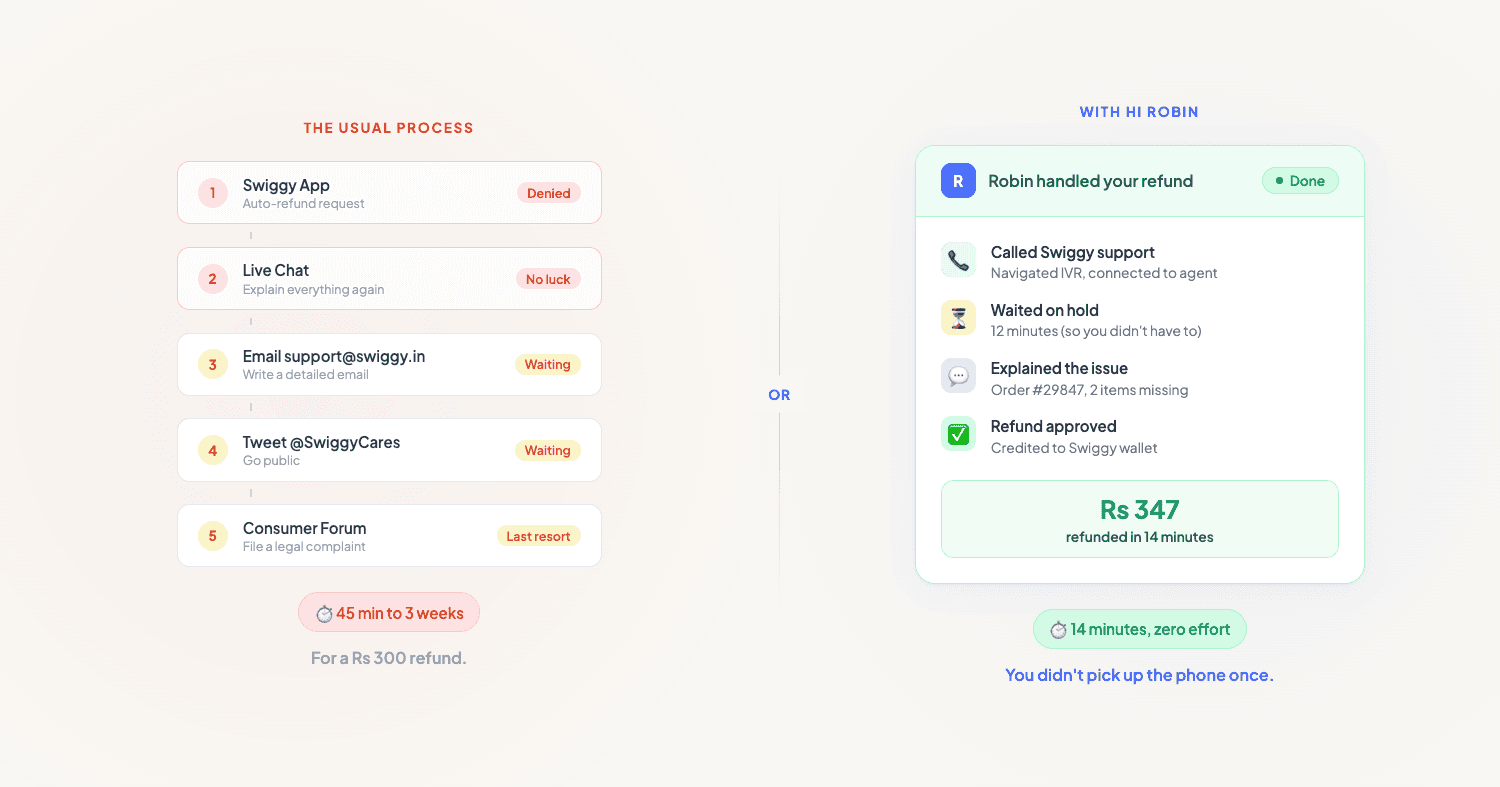
Here's the frustrating part. The refund process above, from app to chat to email to social media to consumer forum, can take anywhere from 10 minutes to several weeks. For a Rs 200 order, most people just absorb the loss because the effort isn't worth the amount.
And this isn't just a Swiggy problem. Zomato, BigBasket, Amazon, Flipkart, your telecom provider, your insurance company: every customer service interaction in India follows a similar pattern. You try the app, the app says no, you escalate to a human, the human takes time, and somewhere in the middle you're on hold for 20 minutes listening to music you didn't choose.
This is the exact kind of task that shouldn't require your time and attention. It's repetitive, process-driven, and involves navigating systems designed to make you give up.
That's why we built hi Robin. Robin is an AI phone assistant that handles these calls for you. Need to follow up with Swiggy customer care? Robin calls, navigates the IVR, waits on hold, explains the issue, and sends you a summary of the outcome. Need to chase an Airtel billing error? Same thing. Need to reschedule a doctor's appointment? Robin handles it.
You shouldn't have to spend 45 minutes on a Rs 300 refund. And with Robin, you don't.

Your phone should work
for you.
Just say hi robin and never worry about incoming calls again. Robin picks up, handles it, and lets you know what happened.
Download hiRobin
